Collision Configurations
A collision configuration sets how strictly the server checks for collisions: a margin (the minimum allowed distance between parts) and a list of excluded pairs (parts allowed to touch, such as a tool and the part it is working on).
Important
Only the configuration named default is used: by the collision check
when you pose a robot (Targets) and by PTP planning
(PTP Trajectories). Other configurations are saved but not used.
Open the editor with ☰ (More setup) → Collision Configs. The
table lists each configuration’s Name, Margin (m) and number of
Pairs. default is marked (active).
Create a configuration
Click Create Config, enter a Name and click Create Config again. New configurations start with a margin of 0 and no excluded pairs.
Use a name that is not already taken. Creating a configuration with an
existing name, including default, replaces it with an empty one: its
margin and excluded pairs are lost.
Edit a configuration
Click Edit in the configuration’s row.
Collision Margin (m): enter the margin and click Save.
Excluded Pairs: choose Component 1 and Component 2 from the lists of collision parts in the workcell, and click Add Pair. Click Remove on a row to check that pair again.
Warning
Composer Studio overwrites the margin of default, keeping its excluded
pairs:
adding a system or a scene object sets it to 0;
creating a PTP trajectory sets it to that trajectory’s Collision Margin, 0 by default (PTP Trajectories).
Check the margin of default after these steps and set it again if
needed.
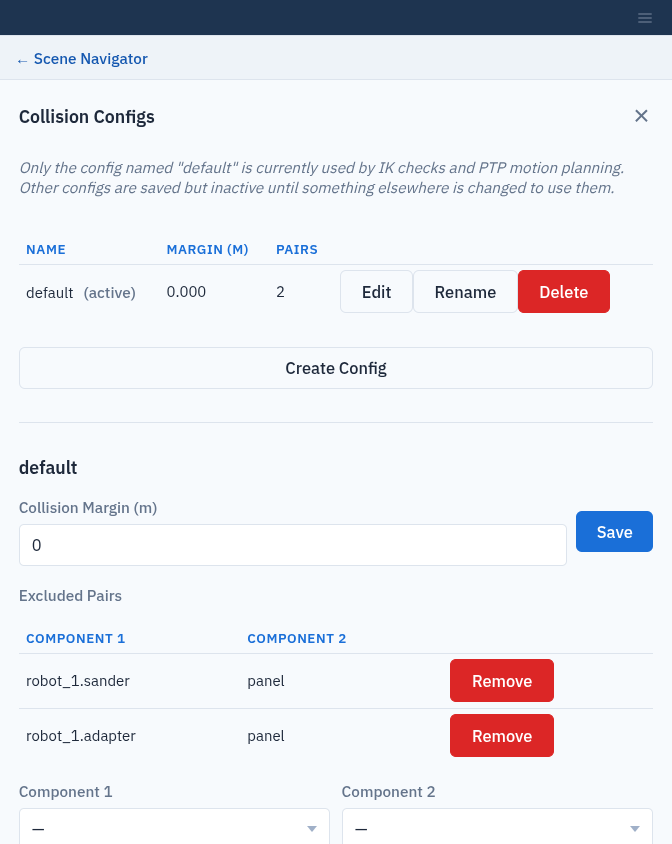
The default configuration, with the sander and its adapter allowed to touch the part.
Rename or delete a configuration
Use Rename or Delete in the configuration’s row. Composer Studio warns
before you rename or delete default: afterwards, collision checks run with
an empty configuration (no margin, no excluded pairs) until a new default
exists. Adding a system or a scene object, or creating a PTP trajectory,
creates a new empty default automatically.